How to Build an AI Chatbot Easily (No Coding Required) with Zuvany
Learn how to build an AI chatbot easily without coding using Zuvany. Create, train, customize, and launch your AI chatbot in minutes using your website content, PDFs, and business data.
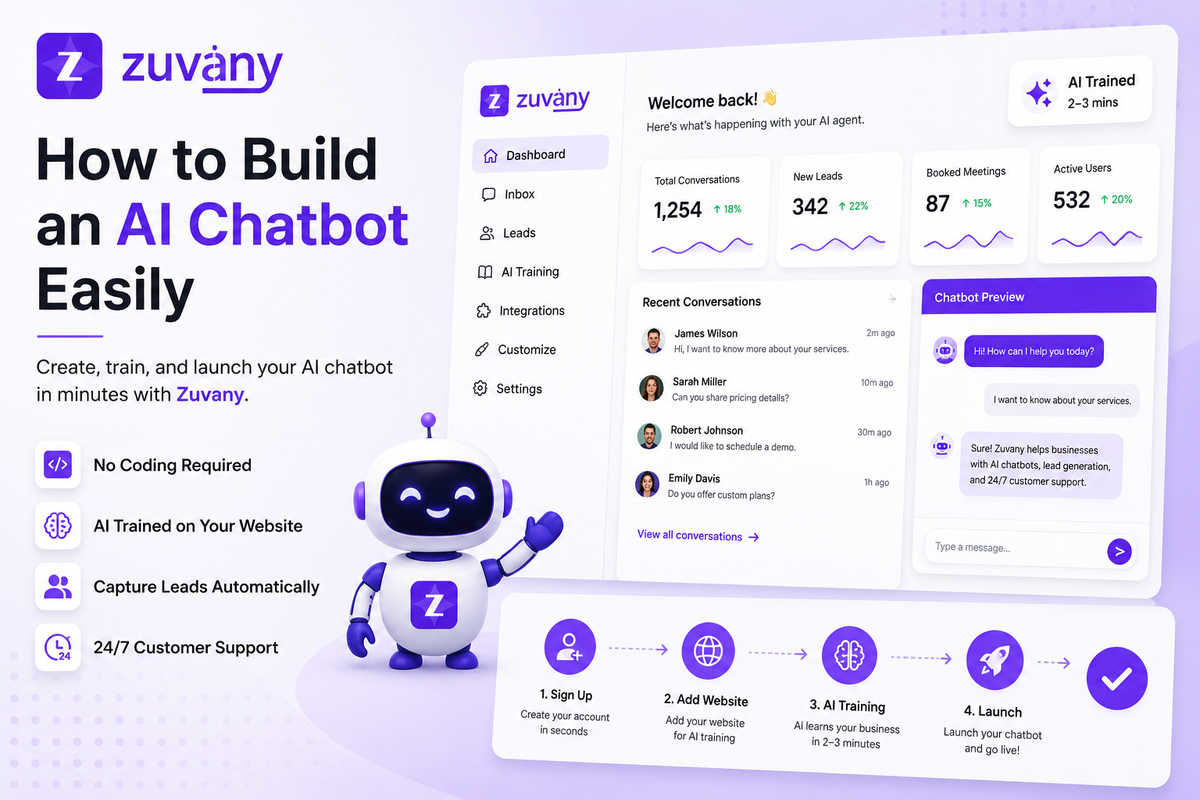
How to Build an AI Chatbot Easily
Building an AI chatbot used to be difficult.
Businesses needed developers, complex integrations, expensive software, and weeks of setup just to launch a simple chatbot on their website.
Today, things are different.
Modern no-code AI chatbot platforms allow businesses to create smart AI assistants within minutes — without technical knowledge.
One of the easiest platforms for this is Zuvany.
In this guide, you’ll learn exactly how to build an AI chatbot easily using Zuvany’s simple onboarding and AI training system.
Why Businesses Need AI Chatbots Today
Customers expect instant answers.
If your business does not respond quickly, visitors leave your website and move to competitors.
AI chatbots help businesses:
- Answer customer questions instantly
- Capture leads automatically
- Provide 24/7 customer support
- Book meetings and demos
- Reduce support workload
- Increase sales conversions
The best part?
You no longer need coding skills to build one.
What is Zuvany?
Zuvany is a no-code AI sales and customer support platform that helps businesses create AI chatbots trained on their own business data.
Instead of building complicated chatbot flows manually, Zuvany automatically learns from your website and business information.
The platform combines:
- AI chatbot
- Lead generation
- Customer support
- AI training
- CRM features
- Conversation inbox
- Website integration
All inside one dashboard.
How to Build an AI Chatbot Easily with Zuvany
Step 1: Visit the Zuvany Website
Go to:
Click the Sign Up button.
Step 2: Create Your Account
Zuvany provides a fast and simple signup process.
You can register using:
- Google account
- Email signup
After signup, you’ll automatically move to the onboarding setup page.
The process is beginner-friendly and designed for quick setup.
Step 3: Set Up Your AI Agent
This is where you create your chatbot.
The onboarding process is simple compared to traditional chatbot builders.
Add Your Agent Name
Choose a name for your AI assistant.
Examples:
- Support Assistant
- Sales Agent
- Product Expert
- AI Help Desk
Your chatbot will use this identity while interacting with visitors.
Define the Agent Purpose
Now explain what your AI should do.
For example:
- Customer support
- Sales assistance
- Lead qualification
- Appointment booking
- Product guidance
This helps the AI understand your business goals and conversation behavior.
Add Your Website URL
This is the most important step.
Paste your business website link.
Example:
- yourcompany.com
- startup.io
- agencysite.com
Once added, Zuvany automatically scans and trains the AI using your website content.
The AI learns:
- Services
- Products
- Pricing details
- FAQs
- Company information
- Support content
This removes the need for manual chatbot scripting.
Similar onboarding-based chatbot training is becoming one of the biggest trends in modern AI chatbot platforms.
Add Optional Business Information
You can also improve your AI training by adding:
- Contact details
- Phone number
- Social media links
- Company description
- Extra business information
This helps the AI provide more accurate answers.
Step 4: Launch Your AI Chatbot
After setup, click the Launch button.
Now Zuvany starts training your AI automatically.
The system:
- Reads your website
- Processes business data
- Understands your content
- Creates your AI chatbot
Training usually takes around 2–3 minutes.
No coding.
No developers.
No complicated workflow setup.
Step 5: Access the Dashboard
After training is complete, you’ll enter the Zuvany dashboard.
This is where you manage your chatbot, conversations, leads, and AI training.
The dashboard is designed for simplicity so even non-technical users can operate it easily.
Key Features Inside the Zuvany Dashboard
1. Website Chatbot Integration
You can connect the chatbot directly to your website.
The setup process is simple and fast compared to traditional chatbot systems.
Most businesses can install the chatbot within minutes.
2. AI Training System
Need better chatbot responses?
You can provide additional training data anytime.
Zuvany supports:
- Text input
- PDFs
- Documents
- Website pages
- Custom knowledge
This improves chatbot accuracy over time.
Modern AI chatbot systems also rely heavily on continuous training and knowledge management to improve response quality.
3. Lead Collection & Qualification
Zuvany is not just a chatbot.
It also works as an AI lead generation system.
You can configure what visitor information should be collected:
- Name
- Phone number
- Requirements
- Budget
- Company details
This helps businesses capture qualified leads automatically.
4. Unified Inbox
All conversations appear inside one inbox.
You can:
- View chats
- Track leads
- Continue conversations manually
- Manage customer interactions
Everything stays organized in one dashboard.
5. Chatbot Customization
Businesses can customize:
- Welcome messages
- Chatbot appearance
- Branding
- Colors
- Agent behavior
- Lead forms
This helps the chatbot match your business identity.
Why Zuvany Makes AI Chatbot Building Easier
Most chatbot platforms become complicated during setup.
Businesses often struggle with:
- Flow builders
- Manual training
- API integrations
- Technical configurations
Zuvany simplifies the entire process.
Instead of spending days building flows, businesses can:
- Sign up
- Add website URL
- Launch AI chatbot
- Start collecting leads
That’s the biggest advantage of Zuvany’s onboarding-focused approach.
Benefits of Using AI Chatbots for Business
24/7 Customer Support
Your AI chatbot works all day without human intervention.
Faster Response Time
Customers receive instant replies instead of waiting for support teams.
Better Lead Conversion
AI can engage visitors before they leave your website.
Reduced Manual Work
Businesses can automate repetitive customer questions and lead collection.
Improved Customer Experience
Visitors receive quick and helpful support anytime.
Best Use Cases for Zuvany
SaaS Startups
Convert website traffic into demo bookings automatically.
Agencies
Capture client enquiries and automate lead generation.
E-commerce Stores
Answer product questions and improve customer support.
Service Businesses
Handle consultations, bookings, and customer enquiries using AI.
Final Thoughts
Building an AI chatbot is no longer complicated.
With Zuvany, businesses can create a trained AI assistant within minutes using their own website content.
The platform focuses on:
- Easy onboarding
- No-code setup
- Fast AI training
- Simple dashboard management
- Lead generation automation
If you want the easiest way to build an AI chatbot for your business website, Zuvany provides one of the simplest solutions available today.
Frequently Asked Questions
Do I need coding knowledge to use Zuvany?
No. Zuvany is fully no-code and beginner-friendly.
How long does chatbot training take?
Usually around 2–3 minutes depending on website size.
Can I upload PDFs and documents for AI training?
Yes. Zuvany supports PDFs, text, and additional business data.
Can the chatbot collect leads automatically?
Yes. The AI can capture customer details like email, phone number, and requirements.
Is website integration easy?
Yes. Zuvany provides simple chatbot integration for websites.
Can I customize the chatbot?
Yes. You can customize branding, welcome messages, colors, and lead collection settings.